Why Is My Mix Distorted? 🎛️

Distortion Isn't Always the Problem
“More is not necessarily better. Better is better.”
— Lee Child
Sometimes distortion is the goal.
A smashed drum room.
A crunchy synth.
An overloaded tape delay.
A distorted bass.
That kind of distortion can sound amazing.
But when your entire mix sounds distorted and you didn't mean it to...
that's usually not character.
That's a gain staging problem.
Or a plugin problem.
Or a master bus problem.
Or all three.
Quick Summary
👉 Mix distortion usually comes from clipping somewhere in the signal chain. Common causes include tracks hitting plugins too hard, output levels increasing without being level-matched, clipping on buses or the master, pushing a limiter too hard, or trying to hit streaming loudness targets too early in the mixing stage.
How Loud Should My Mix Be Before Mastering? 🎧
🎚️ First: What Kind of Distortion Are We Talking About?
Not all distortion sounds the same.
Your mix can distort because of:
- Clipping — the signal exceeds the available headroom and gets chopped off
- Plugin overload — a plugin is being driven harder than intended
- Master bus overload — the combined mix is too loud before it reaches the limiter
- Limiter distortion — the limiter is working too hard and flattening transients
- Export distortion — the file clips on export or conversion
- Monitoring distortion — your speakers, headphones, or interface are distorting, not the mix itself
Before fixing anything, figure out where the distortion is happening.
🚦 The Most Common Cause: Bad Gain Staging
Gain staging means managing level at every stage of the signal chain.
Think of your mix like a highway.
If one lane suddenly narrows, traffic jams.
If one plugin gets slammed with too much level, it can distort the entire chain.
Common Gain Staging Mistakes
- Recording tracks too hot
- Stacking multiple plugins that each add output gain
- Boosting EQ into a compressor into a saturator into a limiter
- Letting buses build up too much level
- Mixing into a master that's already clipping
Why Does My Mix Sound Quiet? 🔊
A distorted mix often starts as a small level problem that compounds over time.
🔌 Bypass Your Plugins One by One
This is one of the fastest ways to find the problem.
If your mix sounds distorted, start bypassing plugins.
Check:
- Individual channel plugins
- Drum bus plugins
- Vocal bus plugins
- Mix bus plugins
- Master chain plugins
What You're Looking For
As you bypass each plugin, ask:
- Does the distortion disappear?
- Does the signal suddenly get much quieter?
- Was that plugin adding too much output gain?
- Is the plugin itself clipping internally?
The Golden Rule
When a plugin is bypassed vs active, the level should usually be similar.
If the active version is dramatically louder, you're probably not hearing “better.”
You're hearing louder.
And louder often becomes distortion later.
If bypassing a plugin suddenly fixes the mix, you've found a suspect.
🎛️ Plugins Can Distort Even If the Channel Meter Looks Fine
This is where beginners get trapped.
A track might not be clipping in the DAW...
but a plugin inside the chain might still be getting overloaded.
Examples:
- A compressor fed by a hot EQ boost
- A tape plugin pushed too hard
- A saturator clipping internally
- A vintage-style emulation reacting badly to modern digital levels
Some plugins are designed to sound better when hit around -18 dBFS RMS or so, because that's closer to analog-style operating levels.
Others are fine with hotter signals.
The point is: not every plugin likes being slammed.
🧪 Check Input vs Output on Every Plugin
A simple workflow:
Step 1
Pull down the channel so it isn't peaking too hard before the plugin.
Step 2
Set the plugin the way you want.
Step 3
Match the output level so the processed signal is roughly the same loudness as the bypassed signal.
This makes it much easier to answer the real question:
Does the plugin sound better, or is it just louder?
🥁 Watch Your Buses
A mix rarely clips because one shaker is too loud.
It clips because the combined signal builds up.
Your drum bus, music bus, vocal bus, FX bus, and master bus are all places where multiple signals combine.
That means they are prime distortion zones.
Common Bus Problems
Drum Bus
Kick + snare + overheads + rooms + parallel compression can overload fast.
How Do I Get My Bass & Kick To Work Together in a Mix?🎚️
Vocal Bus
Stacks of lead vocals, doubles, harmonies, delays, and reverbs can pile up quickly.
Music Bus
Keys, guitars, synths, pads, and samples can create a hidden level problem.
The bus is where “everything seemed fine” turns into clipping.
🎚️ The Master Bus Is Not a Trash Compactor
If your master is peaking at +3 dB before the limiter...
the limiter isn't “saving” your mix.
It's being forced to clean up a mess.
That usually sounds like:
- Crunchy cymbals
- Flat drums
- Harsh vocals
- Pumping low end
- Fatiguing distortion
A Better Target
Before your final limiter, aim for a mix that still has headroom.
A good general target:
- Master peaks around -6 dBFS to -3 dBFS
- Plenty of space before clipping
- No red lights on the master
You don't have to hit exactly -6 dB.
The bigger point is:
Don't mix into a clipped master and expect the limiter to perform miracles.
 ⭐️ Download my Free Music Production Guides or take my free Ableton Live Course ⭐️
🧱 The Limiter Can Cause Distortion Too
Limiters are supposed to stop peaks from clipping.
But if you ask them to do too much, they start creating problems.
Signs Your Limiter Is Working Too Hard
- Kick and snare lose punch
- Hi-hats sound brittle
- Vocals sound flattened
- The whole mix feels choked
- Distortion appears when the chorus hits
Why This Happens
A limiter reduces peaks very quickly.
If it's shaving off too much signal, it can create audible distortion and pumping.
A Better Approach
Use the limiter as the final safety net, not the entire loudness strategy.
If you need 6–10 dB of gain reduction just to make the mix feel competitive...
the problem is earlier in the mix.
📏 LUFS Targets: Helpful, But Dangerous If Misunderstood
LUFS measures loudness over time.
Streaming platforms use loudness normalization, so many producers aim for targets like:
- Spotify: around -14 LUFS integrated
- YouTube: often around -13 to -14 LUFS integrated
- Apple Music / others: similar ballpark, though exact playback behavior varies
These are useful reference points.
But they are not instructions to smash your mix until it hits that number.
LUFS Explained: Integrated, Short-Term & Momentary LUFS Targets for Music and Voice 🎚️
Be Careful Chasing LUFS
A lot of producers see “Spotify is -14 LUFS” and think:
“Cool, I need to force my mix to -14 LUFS right now.”
No.
You need a good mix first.
Then a good master.
Then you can worry about final loudness.
🎯 Mixing vs Mastering Loudness
These are two different jobs.
While Mixing
Focus on:
- Balance
- Tone
- Dynamics
- Headroom
- Avoiding clipping
While Mastering
Focus on:
- Final loudness
- Limiting
- Translation
- Delivery format
If you chase streaming loudness targets too early, you often end up with a distorted, lifeless mix.
Mixing vs Mastering: What's the Difference?
LUFS is a delivery target, not a songwriting strategy.
🔍 A Simple Distortion Checklist
If your mix sounds distorted, check these in order:
1. Is any track clipping?
Look at channel meters.
2. Is any plugin distorting internally?
Bypass plugins one by one.
3. Are plugin outputs level-matched?
Processed vs bypassed should be close.
4. Are any buses clipping?
Drum bus, vocal bus, music bus, mix bus.
5. Is the master clipping before the limiter?
Check peak levels on the master.
6. Is the limiter doing too much?
Watch gain reduction.
7. Are you pushing for loudness too early?
Stop chasing LUFS during the mix.
8. Is the distortion actually in your speakers or headphones?
Test on another playback system.
🎵 The Difference Between Good Distortion and Bad Distortion
Some distortion is musical.
Examples:
- Tape saturation
- Tube overdrive
- Crunchy drum parallel compression
- Dub delay feedback
- Distorted synth bass
That distortion is intentional.
It's chosen.
It's part of the sound design.
Bad distortion is different.
It's the distortion you didn't notice until the export.
Intentional distortion is a color.
Accidental distortion is a leak.
🧠 Why This Happens So Often in DAWs
Because modern DAWs make it easy to keep adding things:
- More plugins
- More boosts
- More compression
- More saturation
- More loudness
And every stage adds level if you're not careful.
A mix can go from clean to distorted gradually, without one obvious moment where it “breaks.”
That's why gain staging matters.
Not because it's glamorous.
Because it keeps the whole system under control.
🧠 FAQ
Q: Why does my mix sound distorted even when the master isn't clipping?
A: A plugin or bus may be clipping internally even if the master meter looks fine.
Q: Can a limiter cause distortion?
A: Yes. If it's doing too much gain reduction, it can flatten transients and create audible distortion.
Q: Should I mix to -14 LUFS for Spotify?
A: No. Focus on a clean, dynamic mix first. LUFS targets are more relevant during mastering and delivery.
Q: How much headroom should I leave on the master?
A: A common target is peaks around -6 dBFS to -3 dBFS before final limiting.
Q: Why does bypassing a plugin change my mix so much?
A: The plugin may be adding a lot of output gain or distortion. Level-match the processed and bypassed versions so you can judge the actual processing, not just the loudness.
🔑 Final Thought
A distorted mix usually isn't one big mistake.
It's a chain of small level decisions that kept getting louder.
A hot vocal into a compressor.
A bright EQ into a saturator.
A drum bus pushed too hard.
A master limiter trying to rescue all of it.
The fix is rarely “turn one thing off.”
The fix is understanding the signal path.
Good gain staging keeps the mix alive.
Bad gain staging turns the mix into damage control.
So if your mix is distorting, don't just ask:
"How do I make it louder?"
Ask:
"Where did it start getting too loud?"
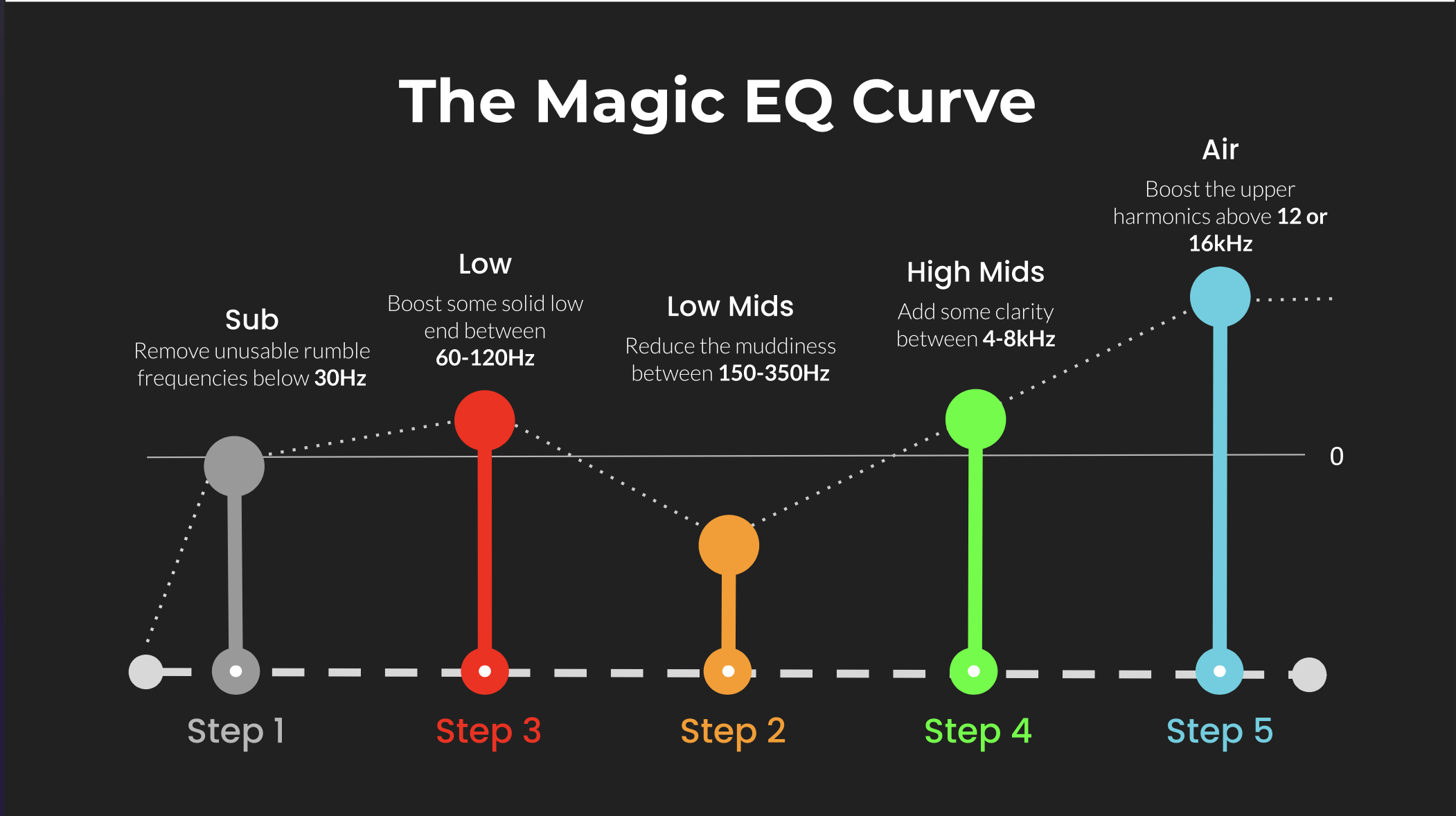 ⭐️ Download my Free Magic EQ settings Guide ⭐️

⭐️ Download my Free Magic Reverb settings Guide ⭐️
#protools #daw #homestudio #recordingschool #recording #musicproduction
Also read:
How to Start Your Own Online Business Teaching Music

Hey, I'm Futch - Music Production Coach and Ableton Certified Trainer

Learn how to make your first song and beat in Ableton Live with my
FREE 90-minute Ableton Live course
I've been teaching audio engineering and music production for 35 years.⭐️
Check out my new online music production program: Music Production Ninja...