Why Does My Mix Sound Quiet? 🔊

Loud Isn’t What You Think
“Not everything that is louder is better.
But everything that sounds better often feels louder.”
Most producers chase loudness the wrong way.
They turn things up.
Add limiters.
Push the master.
And the result?
Still quiet.
Just more distorted.
The truth is simple:
Loudness is not volume.
It’s perception.
Quick Summary
👉 A mix sounds quiet when energy isn’t balanced — especially in the midrange. Proper loudness comes from arrangement, frequency balance, compression, limiting, and controlled low end, not just turning things up.
🎧 1. The Midrange Is the Loudness
Your ears don’t hear all frequencies equally.
They are most sensitive to the midrange (roughly 1 kHz – 5 kHz).
That’s where:
- vocals live
- snares crack
- guitars bite
- synth leads cut
If your mix lacks midrange presence, it will feel quiet —
even if the meters say otherwise.
The Fix
- bring focus to vocals, snare, and lead elements
- use EQ to shape clarity in the mids
- remove unnecessary masking
If the midrange is clear, the mix feels loud.
How To Make Your DAW Mixes Exciting 🎚️
🎛️ 2. Compression — Controlling Energy
Compression doesn’t just reduce peaks.
It raises average level.
Where to Use It
Channels
- control vocals, drums, bass
- smooth dynamics
Subgroups (Buses)
- glue drums together
- shape instrument groups
Master Bus
- gentle compression for cohesion
Compression helps everything sit closer together —
which increases perceived loudness.
🚧 3. Limiting — The Final Ceiling
A limiter sets the maximum level.
It allows you to push the mix louder without clipping.
The Balance
Too little limiting → quiet mix
Too much limiting → flat, lifeless mix
The goal is controlled peaks, not destruction.
How Do I Get My Bass & Kick To Work Together in a Mix?🎚️
🔊 4. Low End — The Silent Loudness Killer
Low frequencies eat headroom.
Kick and bass can dominate your mix energy
without adding perceived loudness.
Common Problems
- too much sub energy
- overlapping kick and bass
- muddy low mids
The Fix
High-Pass Filters (HPF)
- remove unnecessary low frequencies
- clean up non-bass elements
Sidechain Compression
- let the kick and bass take turns
- avoid frequency collisions
Tight low end = more headroom = louder mix
 ⭐️ Download my Free Music Production Guides or take my free Ableton Live Course ⭐️
🎯 5. Reference Mixes — Reality Check
Your ears adapt quickly.
What feels loud in isolation might be quiet in context.
The Solution
Use reference tracks.
Match:
- level
- tonal balance
- energy
Tool Example
This lets you:
- level-match references
- switch instantly
- compare your mix objectively
Power vs Force in Mixing and Mastering Audio🎚️
📊 6. LUFS — Measuring Loudness
Meters don’t just show peaks anymore.
They show perceived loudness.
LUFS Basics
- Integrated LUFS → overall loudness
- Short-term LUFS → recent loudness
- Momentary LUFS → instant loudness
Streaming platforms normalize to around:
- -14 LUFS (approx.)
Tool Example
This helps you:
- measure loudness accurately
- avoid guesswork
- hit target levels
LUFS Explained: Integrated, Short-Term & Momentary LUFS Targets for Music and Voice 🎚️
🎧 7. Your Room Might Be Lying
Sometimes your mix isn’t quiet.
Your monitoring is.
Problems
- poor room acoustics
- headphones with uneven response
- speakers exaggerating low end
The Fix
Speaker Simulation
Audified Mix Checker Pro
Test your mix on different systems.
Headphone + Software Systems
Slate VSX
Simulate professional studios and environments.
If your monitoring lies, your mix decisions will too.
How To Get Accurate Mixes in Your Home Studio With Speaker & Room Simulation Plugins
🧠 The Real Loudness Formula
A loud mix is not one thing.
It’s a combination of:
- midrange clarity
- controlled dynamics
- balanced low end
- smart limiting
- accurate monitoring
Miss one, and the mix falls apart.
🧠 FAQ
Q: Why is my mix quiet compared to Spotify songs?
A: Likely midrange imbalance, weak compression, or poor limiting.
Q: Should I just turn up the limiter?
A: No — fix balance first, then limit.
Q: What LUFS should I aim for?
A: Around -14 LUFS for streaming, depending on style.
Q: Do I need expensive plugins?
A: No — but tools can speed up learning and accuracy.
🔑 Final Thought
Loudness isn’t something you add at the end.
It’s something you build from the beginning.
A loud mix is a balanced mix.
Get the mids right.
Control the lows.
Shape the dynamics.
And suddenly…
It won’t feel quiet anymore.
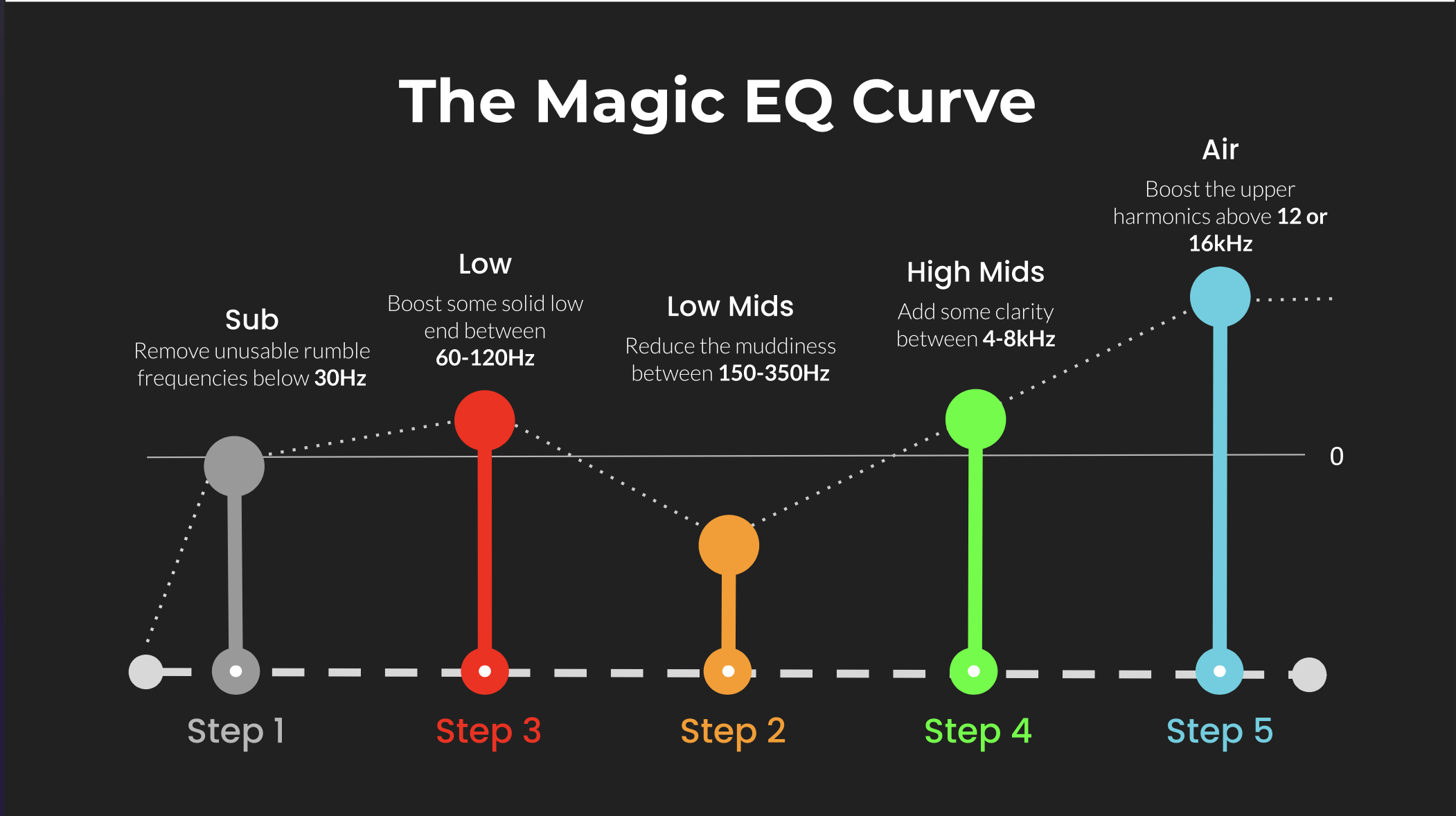 ⭐️ Download my Free Magic EQ settings Guide ⭐️

⭐️ Download my Free Magic Reverb settings Guide ⭐️
#protools #daw #homestudio #recordingschool #recording #musicproduction
Also read:
How to Start Your Own Online Business Teaching Music

Hey, I'm Futch - Music Production Coach and Ableton Certified Trainer

Learn how to make your first song and beat in Ableton Live with my
FREE 90-minute Ableton Live course
I've been teaching audio engineering and music production for 35 years.⭐️
Check out my new online music production program: Music Production Ninja...