Which Pitch Correction Plugin Is Right For Me? 🔌

The Best Plugin Depends on Who You Are
“Different tools for different stages of the journey.”
One of the most common questions in music production is:
"Which pitch correction plugin should I buy?"
The answer depends on what you're trying to accomplish.
A beginner doesn't need the same tools as a professional engineer.
An artist chasing a signature sound doesn't need the same workflow as someone editing a singer-songwriter vocal.
The best choice depends on where you are right now.
Quick Summary
👉 Beginners should start with simple and affordable tools, intermediate producers should learn Melodyne and modern vocal correction workflows, artists should focus on creative vocal tools, and professionals typically combine Melodyne with Auto-Tune Pro.
🎚️ First: Two Different Jobs
Before choosing a plugin, understand that there are two completely different goals.
Pitch Correction
Used to:
- Fix notes
- Improve performances
- Sound natural
- Remain invisible
Think:
- Rock
- Country
- Singer-Songwriters
- Acoustic Music
The Auto-Tune Effect
Used to:
- Create a vocal sound
- Add character
- Produce modern vocal textures
Think:
- Pop
- Hip-Hop
- Trap
- R&B
One hides the technology.
The other celebrates it.
🟢 Beginner
At this stage, focus on:
- Recording
- Editing
- Hearing pitch problems
- Understanding vocal production
Recommended Tools
🥇 MAutoPitch
A free pitch correction plugin that's easy to learn.
Perfect for:
- First recordings
- Home studios
- Learning the basics
🥈 Waves Tune Real-Time
Affordable and easy to understand.
A great first Auto-Tune style plugin.
🥉 Waves Tune
An affordable way to learn manual pitch correction and note editing.
*Just remember with Waves plugins, they are cheap at first but you'll be paying for upgrades forever so the plugins keep working with your newest OS (not good).
Why These Tools?
You don't need a complicated workflow yet.
You need:
- Simplicity
- Affordability
- Quick results
Learn the fundamentals before buying expensive software.
🔵 Intermediate
At this stage, you'll start noticing:
- Tuning issues
- Timing issues
- Inconsistent performances
Now it's time to become more precise.
Recommended Tools
🥇 Melodyne Essential
The industry-standard correction workflow.
Perfect for:
- Natural tuning
- Note editing
- Transparent correction
🥈 Klevgrand Altitude
A modern pitch correction plugin focused on speed and simplicity.
Great for producers who want natural results without spending hours editing notes manually.
🥉 Waves Tune Real-Time
Great for modern vocal production.
Simple and effective.
Why These Tools?
You'll begin developing critical listening skills.
Now you need tools that offer more control.
This is where pitch correction becomes part of your workflow.
 ⭐️ Download my Free Music Production Guides or take my free Ableton Live Course ⭐️
🔴 Artist
Artists often care less about fixing mistakes and more about creating a sound.
At this stage, pitch correction becomes a creative effect.
Recommended Tools
🥇 Auto-Tune Pro
The benchmark for modern vocal production.
🥈 Slate Digital MetaTune
A modern alternative with a fast workflow and excellent sound.
🥉 Vovious
An AI-assisted vocal production platform that helps artists create, enhance, and experiment with vocal performances.
Why These Tools?
They help shape:
- Vocal identity
- Character
- Vibe
Famous Artists that have used the Auto-Tune Effect
- T-Pain
- Travis Scott
- Future
- Kanye West
At the artist level, pitch correction becomes an instrument.
🟡 Professional
Professionals need:
- Speed
- Transparency
- Flexibility
- Reliability
They also work with many different artists.
Recommended Tools
🥇 Melodyne Studio
Still the king of detailed vocal editing.
🥈 Auto-Tune Pro
The industry standard for modern tuning.
🥉 Synchro Arts RePitch
A powerful modern editing platform from the makers of VocAlign.
Why These Tools?
Professional productions often require:
- Subtle correction
- Heavy correction
- Creative effects
Sometimes all within the same session.
Professionals don't choose between Melodyne and Auto-Tune. They usually use both.
🎤 What Most Professionals Actually Do
A typical professional vocal chain looks like this:
Melodyne
Used for:
- Fixing notes
- Editing timing
- Correcting performances
Auto-Tune Pro
Used for:
- Consistency
- Polish
- Modern vocal sound
The singer hears a natural performance.
The listener hears a finished record.
Melodyne performs the surgery.
Auto-Tune applies the makeup.
🏆 Simplest Recommendations
If you just want the short answer:
Beginner
🥇 MAutoPitch
Intermediate
🥇 Melodyne Essential
🥈 Klevgrand Altitude
Artist
🥇 Auto-Tune Pro
🥈 MetaTune
🥉 Vovious
Professional
🥇 Melodyne Studio + Auto-Tune Pro
🥈 Synchro Arts RePitch
🧠 FAQ
Q: What's the best free pitch correction plugin?
A: MAutoPitch.
Q: What's the best Auto-Tune alternative?
A: MetaTune and Waves Tune Real-Time.
Q: What's the best plugin for natural vocal correction?
A: Melodyne.
Q: Do professionals still use Auto-Tune?
A: Absolutely.
Q: Do I need both Melodyne and Auto-Tune?
A: Eventually, many producers find that each solves a different problem.
🔑 Final Thought
The goal isn't perfect pitch.
The goal is communication.
Sometimes you want listeners to hear the singer.
Sometimes you want listeners to hear the production.
Choose Melodyne when you want transparency.
Choose Auto-Tune when you want character.
Choose Vovious when you want to explore the new frontier of AI-assisted vocal production.
And remember:
The best pitch correction plugin is the one that helps the song connect with the listener.
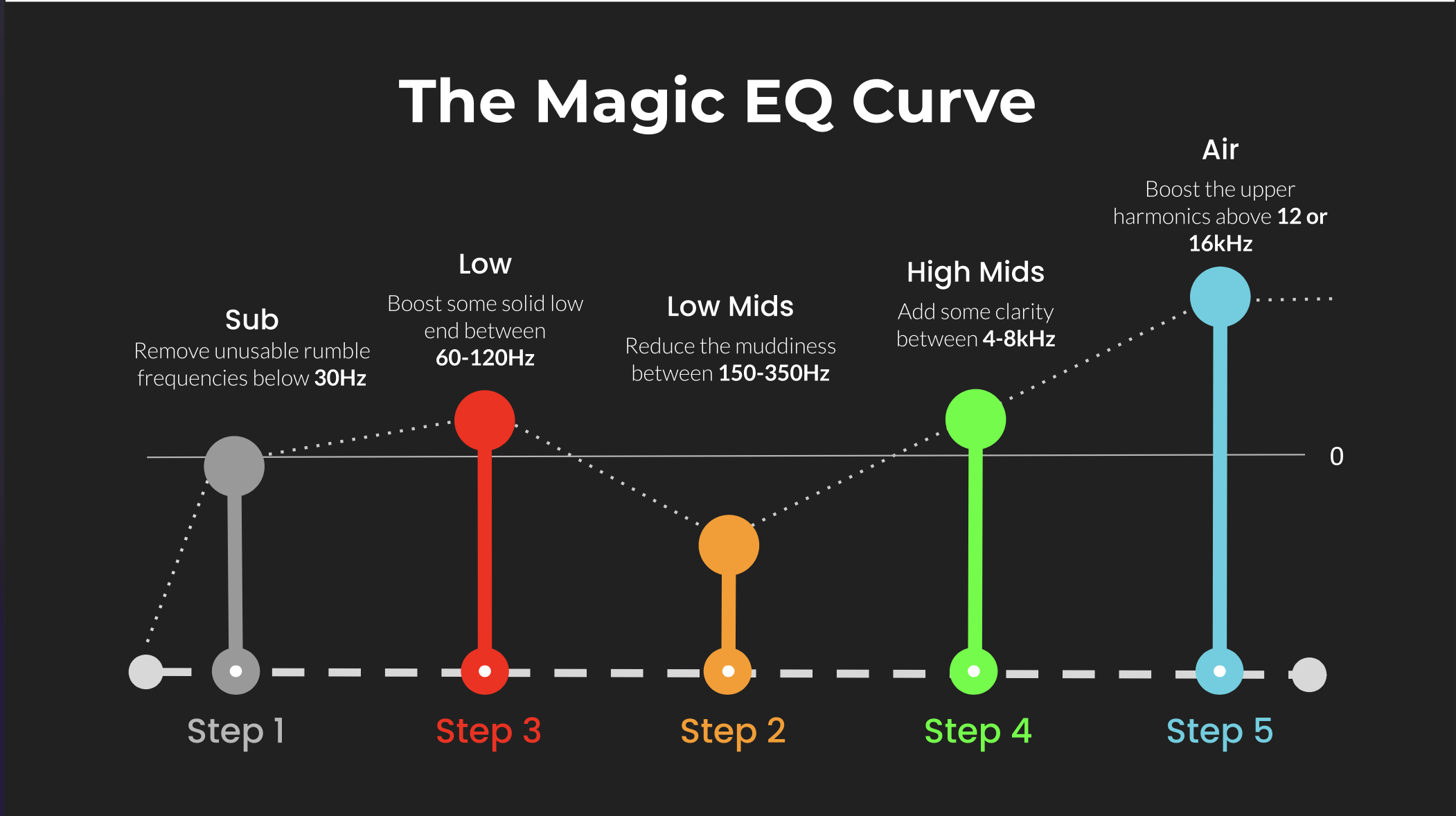 ⭐️ Download my Free Magic EQ settings Guide ⭐️

⭐️ Download my Free Magic Reverb settings Guide ⭐️
#protools #daw #homestudio #recordingschool #recording #musicproduction
Also read:
How to Start Your Own Online Business Teaching Music

Hey, I'm Futch - Music Production Coach and Ableton Certified Trainer

Learn how to make your first song and beat in Ableton Live with my
FREE 90-minute Ableton Live course
I've been teaching audio engineering and music production for 35 years.⭐️
Check out my new online music production program: Music Production Ninja...