The Illusion of Space: How Mix Engineers Trick Your Ears 🎧

Your Mix Isn’t Wide. Your Brain Is
When you listen to a great mix, it feels wide, deep, and three-dimensional.
But the reality is:
There is no real space in your speakers.
Just two points of sound — left and right.
Everything else?
It’s an illusion.
Mix engineers don’t create space.
They trick your ears into perceiving it.
Quick Summary
👉 Mix engineers create the illusion of space by manipulating timing, phase, level, frequency, and reflections using panning, reverb, the Haas effect, polarity, and stereo processing.
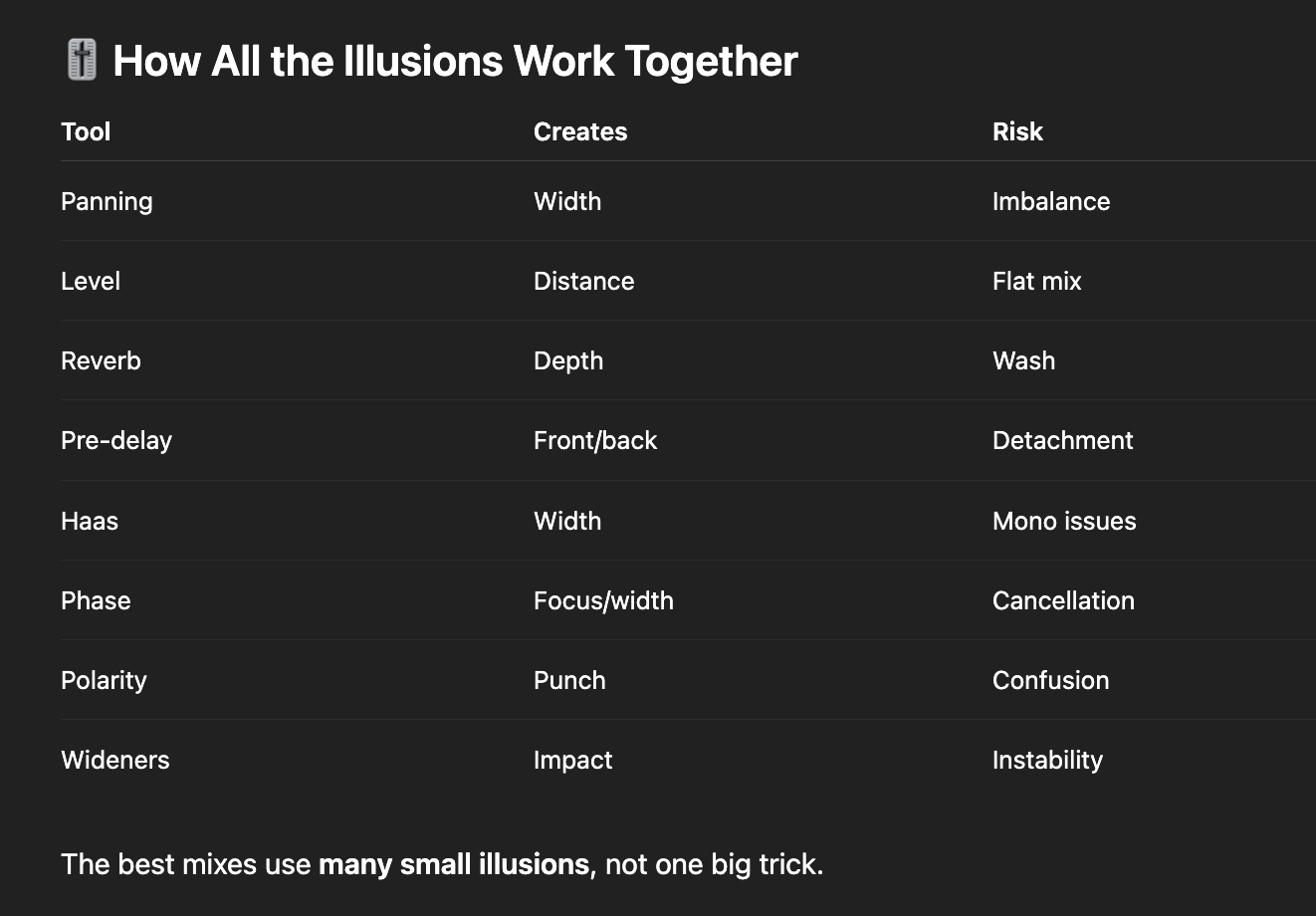
🎚️ 1. Panning — Horizontal Illusion
Panning is the most obvious spatial trick.
By placing sounds left, center, or right, you create width.
How it works
Your brain localizes sound by comparing:
-
level differences
-
arrival time differences
Hard-panned elements feel wide.
Centered elements feel close and focused.
Why it works
Your ears evolved to locate sound sources — panning exploits that instinct.
How To Make Your DAW Mixes Exciting 🎚️
🎚️ 2. Level & Distance — Loud Feels Close
Before reverb, before stereo tricks, there’s volume.
-
louder = closer
-
quieter = farther
This simple rule shapes depth more than most plugins.
Practical insight
A vocal feels closer when it’s louder and drier — even without EQ.
🎚️ 3. Reverb — Depth Without Distance
Reverb tells your brain where a sound exists in space.
Short, dry reverb → close
Long, dark reverb → far
Engineers use reverb to simulate:
-
room size
-
wall distance
-
environment type
But the key isn’t adding reverb — it’s contrasting wet and dry.
Space is created by comparison, not by excess.
Creating Depth in Your Mix: Reverb and Delay Techniques & Settings
🎚️ 4. Pre-Delay — The Depth Cheat Code
Pre-delay separates the dry sound from the reverb tail.
-
more pre-delay = sound feels closer
-
less pre-delay = sound feels farther
It’s one of the fastest ways to move something forward or backward in the mix.
🎚️ 5. The Haas Effect — Width Without Reverb
The Haas effect uses timing differences to create width.
If the same sound hits one ear slightly before the other (about 1–40 ms), your brain hears it as wide — not echoey.
How engineers use it
-
delay one side slightly
-
no feedback
-
no audible echo
Result: instant width.
Warning
Too much Haas = phase problems in mono.
 ⭐️ Start by downloading all of my FREE Music Production Guides ⭐️ It took me years to learn this stuff!
🎚️ 6. Phase — Invisible Power
Phase relationships affect how wide or focused a sound feels.
-
aligned phase = solid center
-
misaligned phase = width or weakness
Stereo width often comes from controlled phase differences.
But uncontrolled phase leads to:
-
hollow sound
-
disappearing elements
-
mono collapse
Phase is subtle — and powerful.
The Cycle of Sound: 6 Ways to Measure Audio Waveforms
🎚️ 7. Polarity — Push and Pull
Polarity flips the waveform upside down.
Sometimes flipping polarity:
-
tightens low end
-
centers a sound
-
fixes cancellation
-
improves punch
It’s not a creative effect — it’s a relationship check.
Small change. Big perception shift.
🎚️ 8. Stereo Wideners — Perception Manipulators
Stereo wideners exaggerate differences between left and right.
They may use:
-
phase offsets
-
EQ differences
-
delays
-
mid/side processing
Used lightly, they enhance width.
Used heavily, they destroy mono compatibility.
Rule
Wide is impressive.
Stable is professional.
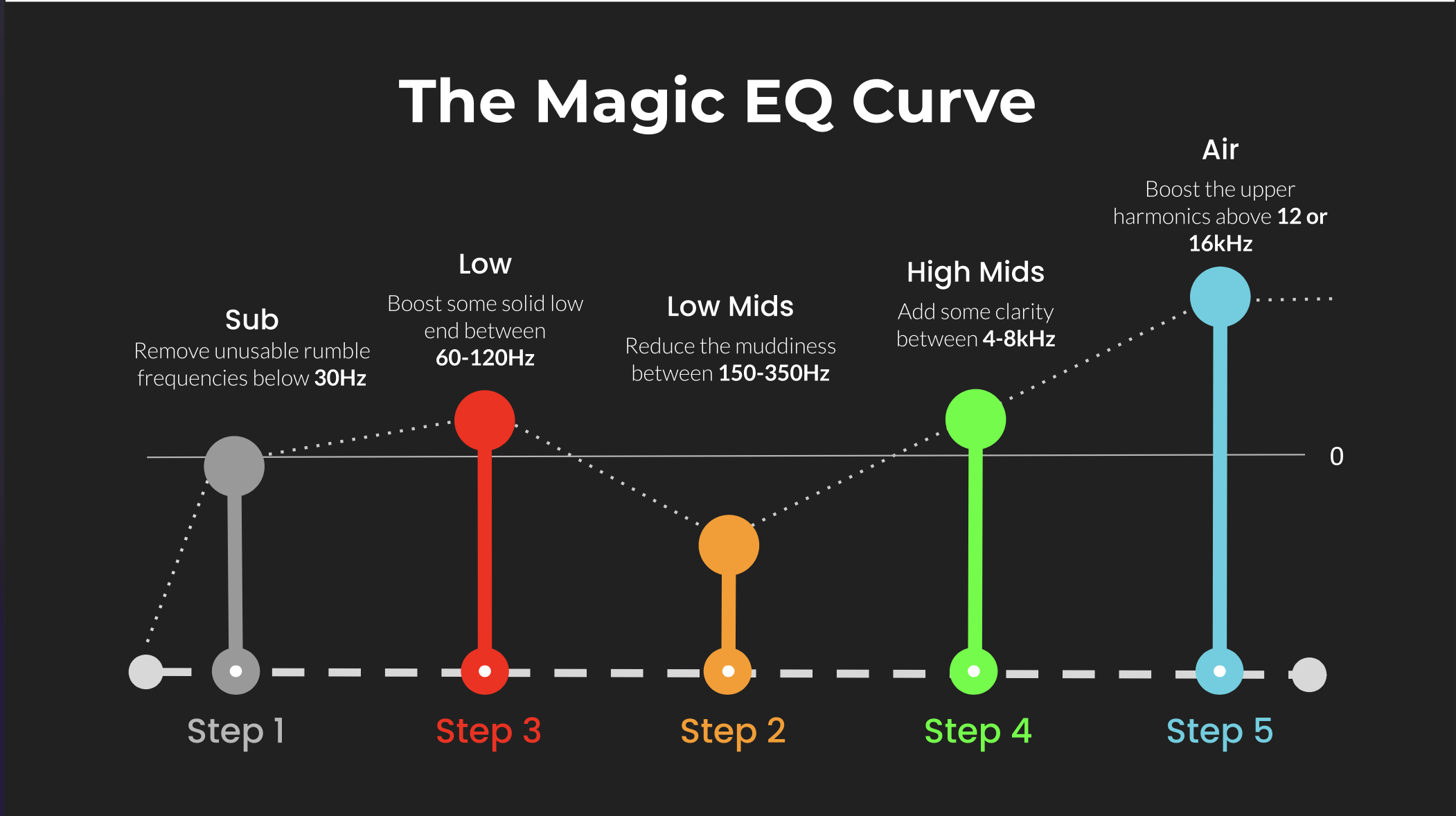
🎚️ 9. Frequency Placement — Space Through Contrast
High frequencies feel closer.
Low frequencies feel bigger but less directional.
Engineers use EQ to carve space by:
-
removing lows from distant sounds
-
brightening focal elements
-
darkening background layers
Space isn’t just left and right — it’s frequency hierarchy.
 ⭐️ Try my FREE Ableton Live Course. Learn Ableton Live in 90 Minutes!
🧠 FAQ
Q: Why does my mix feel narrow?
A: Too many elements are centered, dry, or competing for the same space.
Q: Should everything be wide?
A: No. Width only works if something stays centered.
Q: Why does my mix not translate in mono?
A: Excessive phase-based widening or Haas delays.
Q: What’s the safest way to add space?
A: Contrast — dry vs wet, loud vs quiet, center vs sides.
🔑 Why This Matters
Great mixes don’t rely on space — they design perception.
There is no width in your speakers.
There is only timing, level, and illusion.
Once you understand how the ear is fooled, you stop guessing — and start placing sounds exactly where you want them to live.
 ⭐️ Download my Free Magic EQ settings Guide ⭐️

⭐️ Download my Free Magic Reverb settings Guide ⭐️
#protools #daw #homestudio #recordingschool #recording #musicproduction
Also read:
How to Start Your Own Online Business Teaching Music

Hey, I'm Futch - Music Production Coach and Ableton Certified Trainer

Learn how to make your first song and beat in Ableton Live with my
FREE 90-minute Ableton Live course
I've been teaching audio engineering and music production for 35 years.⭐️
Check out my new online music production program: Music Production Ninja...