DAW Mixing: Why Is My Mix Muddy? 🔊

When Everything Blurs Together
“If everything sounds big… nothing sounds big.”
You hit play.
The drums are there.
The bass is there.
The vocals are there.
But instead of clarity…
It feels like a fog.
No separation.
No punch.
No definition.
That’s what producers call mud.
Quick Summary
👉 A muddy mix is caused by too much low-mid frequency buildup (roughly 100–350 Hz), often combined with poor monitoring and room acoustics. The solution is controlled EQ, better monitoring, and using reference tracks.
⭐️Use this Magic EQ Curve to prevent mud.⭐️
🎧 What Does “Muddy” Actually Mean?
Muddy = too much energy in the low-mid range.
Typically around:
- 150–350 Hz → low-mids
This is where:
- bass lives
- kick overlaps
- guitars get thick
- vocals lose clarity
When too many sounds stack here…
Everything blends into one undefined mass.
Mud is not a lack of highs.
It’s too much overlap in the lows.
🎛️ 1. Too Many Sounds, Same Space
The biggest cause of mud:
Multiple instruments fighting for the same frequency range.
Common collisions:
- kick + bass
- guitar + piano
- synth pads + vocals
The Fix
Use EQ to create space.
- carve unnecessary lows from non-bass elements
- reduce low-mid buildup in busy instruments
- give each sound its own “lane”
Clarity comes from separation.
✂️ 2. Use EQ to Clean the Low End
EQ is your primary tool for removing mud.
High-Pass Filters (HPF)
Cut low frequencies below 30Hz where they aren’t needed:
- vocals
- guitars
- synths
- percussion
This removes hidden buildup.
Low-Mid Cleanup
Look around 150–350 Hz.
If things feel boxy or cloudy:
- apply gentle cuts
- avoid overdoing it
- trust your ears
You don’t need more top end.
You need less unnecessary low end.
EQ Explained Like Sculpting Stone 🗿
🎧 3. Your Room Might Be Lying
Sometimes the mix isn’t muddy.
Your room is.
Common Issues
- untreated rooms exaggerate low frequencies
- bass builds up in corners
- reflections blur clarity
This leads to bad decisions:
You cut lows too much… or not enough.
Mixing and Mastering: Getting Consistent Sounding Mixes 🎚️
The Fix — Better Monitoring
Flat Headphones & Speakers
Choose accurate monitoring, not hyped sound.
Calibration Software
This helps:
- flatten your speakers or headphones
- correct frequency imbalances
- give you a more truthful listening environment
If you can’t hear the problem, you can’t fix it.
 ⭐️ Download my Free Music Production Guides or take my free Ableton Live Course ⭐️
🎯 4. Use Reference Mixes
Your ears adapt quickly.
After a few minutes, muddy starts to sound normal.
The Solution
Use reference tracks.
Compare your mix to:
- professional songs in your genre
- similar arrangements
- similar instrumentation
Focus on:
- low-end tightness
- clarity in the mids
- separation between elements
Reference mixes reset your ears.
🔊 5. Arrangement Matters More Than Plugins
Sometimes the issue isn’t EQ.
It’s arrangement.
Too many elements playing at once.
Too many layers in the same range.
The Fix
- mute unnecessary parts
- simplify layers
- create contrast
A clean arrangement is the first mix decision.
🎧 6. The Mud Checklist
If your mix feels muddy, check this:
- too much energy below 300 Hz
- instruments overlapping in low-mids
- no high-pass filtering
- poor monitoring environment
- no reference mixes
Fix these first.
🧠 FAQ
Q: What frequency range causes mud?
A: Typically below 30Hz or between150–350 Hz.
Q: Should I high-pass everything?
A: Not really — just remove unnecessary sub frequencies on a few key tracks.
Q: Can muddy mixes be fixed in mastering?
A: Not effectively — fix it in the mix.
Q: Do I need acoustic treatment?
A: It helps, but calibration tools can get you closer.
🔑 Final Thought
Mud isn’t a mystery.
It’s overlap.
Too many sounds.
Too much low-mid energy.
Not enough separation.
A clear mix is not about adding more.
It’s about removing what doesn’t need to be there.
Clean the lows.
Shape the mids.
Trust your ears.
And the fog disappears.
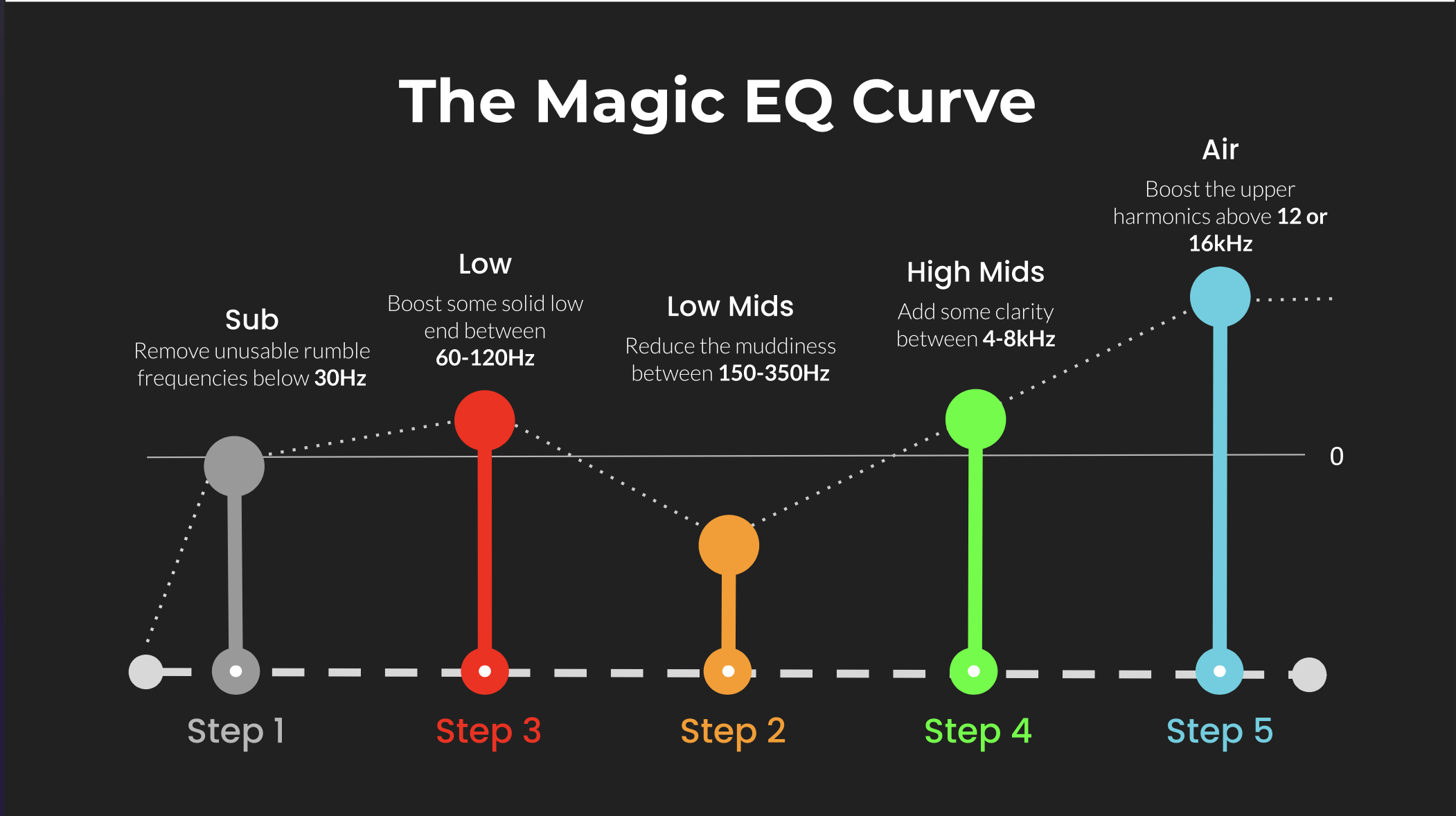 ⭐️ Download my Free Magic EQ settings Guide ⭐️

⭐️ Download my Free Magic Reverb settings Guide ⭐️
#protools #daw #homestudio #recordingschool #recording #musicproduction
Also read:
How to Start Your Own Online Business Teaching Music

Hey, I'm Futch - Music Production Coach and Ableton Certified Trainer

Learn how to make your first song and beat in Ableton Live with my
FREE 90-minute Ableton Live course
I've been teaching audio engineering and music production for 35 years.⭐️
Check out my new online music production program: Music Production Ninja...